


Most Linksys routers use 192.168.1.1 as their default IP address. Some access points, range extenders and older models use something else. This page lists every default Linksys IP address we know of and shows you how to find or change yours.
What Is the Router's IP Address?
The router's IP address is its address on your home network. You type it into a web browser to open the router's setup pages. It is a private (internal) address. It isn't the public IP address that websites see. That one comes from your Internet provider.
Common Linksys IP Addresses
- 192.168.1.1: by far the most common. It's used by the WRT54G, the E-series, the EA-series, the WRT AC routers and Velop.
- 192.168.0.1: some older routers and DSL modem/routers.
- 192.168.1.245, 192.168.1.250 and 192.168.1.254: wireless access points, bridges and some range extenders.
- 192.168.15.1: a handful of cable modem/routers.
- http://myrouter.local: not an IP address, but it opens the setup pages on Smart Wi-Fi and Velop routers, whatever the IP address is.
Every Known Linksys Default IP Address
Your router uses one of these addresses unless someone has changed it. Find your model below:
| Linksys Model | IP Address |
| ADSL2MUE | 192.168.1.1 |
| AG241 | 192.168.1.1 |
| AG300 | 192.168.1.1 |
| AM200 | 192.168.1.1 |
| AM300 | 192.168.1.1 |
| BEFCMUH4 | 192.168.0.1 |
| BEFDSR41W | 192.168.1.1 |
| BEFN2PS4 | 192.168.1.1 |
| BEFSR11 | 192.168.1.1 |
| BEFSR41 | 192.168.1.1 |
| BEFSR41v4 | 192.168.1.1 |
| BEFSR41W | 192.168.1.1 |
| BEFSR81 | 192.168.1.1 |
| BEFSR81v2 | 192.168.1.1 |
| BEFSRU31 | 192.168.1.1 |
| BEFSX41 | 192.168.1.1 |
| BEFVP41 | 192.168.1.1 |
| BEFW11P1 | 192.168.1.1 |
| BEFW11S4 | 192.168.1.1 |
| befws1s4 | 192.168.1.1 |
| CG7500 | 192.168.0.1 |
| CG7500 | 192.168.1.1 |
| CIT400 | 192.168.15.1 |
| DD-WRT | 192.168.0.1 |
| DD-WRT | 192.168.1.1 |
| E1000 | 192.168.1.1 |
| E1000 | http://my.E1000/ |
| E1200 | 192.168.1.1 |
| E1200 v2.0 | 192.168.1.1 |
| E1500 | 192.168.1.1 |
| E1550 | 192.168.1.1 |
| E1700 | 192.168.1.1 |
| E2000 | 192.168.1.1 |
| E2100L | 192.168.1.1 |
| E2500 | 192.168.1.1 |
| E2500 | 192.168.10.1 |
| E3000 | 192.168.1.1 |
| E3200 | 192.168.1.1 |
| E4200 | 192.168.1.1 |
| E4200V2 Smart Wi-Fi | 192.168.1.1 |
| E5400 | 192.168.1.1 |
| E5400 | 192.168.10.1 |
| E7350 | 192.168.1.1 |
| E800 | 192.168.1.1 |
| E8350 | 192.168.1.1 |
| E8400 | 192.168.1.1 |
| E900 | 192.168.1.1 |
| EA2700 | 192.168.1.1 |
| EA2750 | 192.168.1.1 |
| EA3500 | 192.168.1.1 |
| EA4500 | 192.168.1.1 |
| EA4500 Smart Wi-Fi | 192.168.1.1 |
| EA5800 | 192.168.1.1 |
| EA6100 | 192.168.1.1 |
| EA6200 | 192.168.1.1 |
| EA6300 | 192.168.0.1 |
| EA6350 | 192.168.1.1 |
| EA6380 | 192.168.1.1 |
| EA6400 | 192.168.1.1 |
| EA6400 | www.linksyssmartwifi.com |
| EA6500 | 192.168.1.1 |
| EA6500 | www.ciscoconnectcloud.com |
| EA6700 | 192.168.1.1 |
| EA6900 | 192.168.1.1 |
| EA7200 | 192.168.1.1 |
| EA7200 | http://linksyssmartwifi.com / |
| EA7300 | 192.168.1.1 |
| EA7400 | 192.168.1.1 |
| EA7400 | http://myrouter.local/ |
| EA7450 | 192.168.1.1 |
| EA7450 | http://myrouter.local/ |
| EA7500 | 192.168.1.1 |
| EA8300 | 192.168.1.1 |
| EA8300 | http://linksyssmartwifi.com/ |
| EA8500 | 192.168.1.1 |
| EA8500 | http://myrouter.local/ |
| EA9200 | 192.168.1.1 |
| EA9300 | 192.168.1.1 |
| EA9400 | 192.168.1.1 |
| EA9500 | 192.168.1.1 |
| HG200 | 192.168.1.1 |
| HR200 | 192.168.1.1 |
| LRT214 | 192.168.1.1 |
| LRT224 | 192.168.1.1 |
| MR8300 | 192.168.1.1 |
| MR8300 | http://linksyssmartwifi.com/ |
| MR9000 | 192.168.1.1 |
| MR9600 | 192.168.1.1 |
| Network Everywhere NR041 | 192.168.1.1 |
| RT042 | 192.168.1.1 |
| RT31P2 | 192.168.1.1 |
| RT31P2 | 192.168.15.1 |
| RT41-BU | 192.168.1.1 |
| RT41P2 AT | 192.168.1.1 |
| RT41P2 AT | 192.168.15.1 |
| RTP300 | 192.168.15.1 |
| RV016 | 192.168.1.1 |
| RV042 | 192.168.1.1 |
| RV082 | 192.168.1.1 |
| RVS4000 | 192.168.1.1 |
| SPA-1001 | 192.168.0.1 |
| SPA-2002 | 192.168.0.1 |
| SPA-2100 | 192.168.0.1 |
| SPA-2102 | 192.168.0.1 |
| SPA-3000 | 192.168.1.10 |
| SPA-3102 | 192.168.0.1 |
| SPA-400 | 192.168.0.1 |
| SPA-841 | 192.168.0.1 |
| SPA-9000 | 192.168.0.1 |
| SPA-941 | 192.168.0.1 |
| SRW2008 | 192.168.1.254 |
| SRW2008P | 192.168.1.254 |
| SRW2016 | 192.168.1.254 |
| SRW2024P | 192.168.1.254 |
| SRW2048 | 192.168.1.254 |
| SRW208 | 192.168.1.254 |
| SRW208G | 192.168.1.254 |
| SRW208L | 192.168.1.254 |
| SRW224 | 192.168.1.254 |
| SRW248G4 | 192.168.1.254 |
| UTA200-TM | 192.168.1.1 |
| UTA200-TM | 192.168.29.1 |
| Velop MX4000 | 192.168.1.1 |
| Velop MX4000 | http://www.linksyssmartwifi.com/ |
| Velop WHW01 | 192.168.1.1 |
| WAG120N | 192.168.1.1 |
| WAG160N | 192.168.1.1 |
| WAG200G | 192.168.1.1 |
| WAG300N | 192.168.1.1 |
| WAG310G | 192.168.1.1 |
| WAG320N | 192.168.1.1 |
| WAG325N | 192.168.1.1 |
| WAG354G | 192.168.1.1 |
| WAG54G | 192.168.1.1 |
| WAG54G-XW | 192.168.1.1 |
| WAG54G2 | 192.168.1.1 |
| WAG54G2-NL | 192.168.1.1 |
| WAG54GP2 | 192.168.1.1 |
| WAG54GS | 192.168.1.1 |
| WAG54GX2 | 192.168.1.1 |
| WAP11v1.01 | 192.168.1.250 |
| WAP11v1.07 | 192.168.1.250 |
| WAP11v2.2 | 192.168.1.250 |
| WAP11v2.6 | 192.168.1.250 |
| WAP200 | 192.168.1.245 |
| WAP2000 | 192.168.1.245 |
| WAP200E | 192.168.1.245 |
| WAP4400N | 192.168.1.245 |
| WAP51AB | 192.168.1.250 |
| WAP54GP | 192.168.1.245 |
| WAP54Gv1 | 192.168.1.245 |
| WAP54Gv1.09 | 192.168.1.245 |
| WAP54Gv1.1 | 192.168.1.245 |
| WAP54Gv2 | 192.168.1.245 |
| WAP54Gv3 | 192.168.1.245 |
| WAP55AG | 192.168.1.246 |
| WAP610N | 192.168.1.1 |
| WCG200 | 192.168.0.1 |
| WCG200 | 192.168.1.1 |
| WET11 | 192.168.0.1 |
| WET11v2 | 192.168.1.1 |
| WET11v2 | 192.168.1.225 |
| WET200 | 192.168.1.226 |
| WET54G | 192.168.1.226 |
| WET54GS5 | 192.168.1.226 |
| WET54Gv2 | 192.168.1.226 |
| WET54Gv3-1.08 | 192.168.1.226 |
| WET54Gv3-2.07 | 192.168.1.226 |
| WET610Nv1 | 192.168.1.250 |
| WET610Nv1.0.01 | 192.168.1.250 |
| WGA54AG | 192.168.1.250 |
| WGA54G | 192.168.1.250 |
| WGA600N | 192.168.1.250 |
| WMB54G | 192.168.1.210 |
| WML11B | 192.168.0.1 |
| WPS11 | 192.168.0.1 |
| WPS54G | 192.168.1.1 |
| WPS54GU2 | 192.168.0.1 |
| WPSM54Gv100F | 192.168.1.1 |
| WPSM54Gv1017 | 192.168.0.1 |
| WPSM54Gv1017 | 192.168.1.1 |
| WRE54G | 192.168.1.240 |
| WRE54Gv2 | 192.168.1.240 |
| WRE54Gv3 | 192.168.1.240 |
| WRH54G | 192.168.1. |
| WRH54G | 192.168.1.1 |
| WRK54G | 192.168.1.1 |
| WRP200 | 192.168.1.1 |
| WRP400 | 192.168.15.1 |
| WRT100 | 192.168.1.1 |
| WRT100 | 192.168.2.1 |
| WRT110 | 192.168.1.1 |
| WRT1200AC | 192.168.1.1 |
| WRT120N | 192.168.1.1 |
| WRT150 | 192.168.1.1 |
| WRT150N | 192.168.1.1 |
| WRT150N-PT | 192.168.1.1 |
| WRT160N | 192.168.1.1 |
| WRT160N-HP | 192.168.1.1 |
| WRT160NL | 192.168.1.1 |
| WRT1900AC | myrouter.local |
| WRT1900AC | 192.168.1.1 |
| WRT1900ACS | 192.168.1.1 |
| WRT1900ACS | 192.168.42.1 |
| WRT300N | 192.168.1.1 |
| WRT300N | 192.168.1.100 |
| WRT310N | 192.168.1.1 |
| WRT310N | 192.168.2.1 |
| WRT310N-ES | 192.168.1.1 |
| WRT310N-ES | 192.168.2.1 |
| WRT3200 | 192.168.1.1 |
| WRT3200ACM | 192.168.0.1 |
| WRT3200ACM | 192.168.1.1 |
| WRT3200ACM | 192.168.42.1 |
| WRT3200ACM | http://myrouter.local/ |
| WRT320N | 192.168.1.1 |
| WRT32X | 192.168.1.1 |
| WRT32XB | 192.168.1.1 |
| WRT330N | 192.168.1.1 |
| WRT350N | 192.168.1.1 |
| WRT400N | 192.168.1.1 |
| WRT400N | 192.168.1.2 |
| WRT51AB | 192.168.1.1 |
| WRT54AG | 192.168.1.1 |
| WRT54G | 192.168.1.1 |
| WRT54G | 192.168.2.1 |
| WRT54G-TM | 192.168.0.1 |
| WRT54G2 | 192.168.1.1 |
| WRT54G3G | 192.168.1.1 |
| WRT54GC | 192.168.1.1 |
| WRT54GH | 192.168.1.1 |
| WRT54GL | 192.168.1.1 |
| WRT54GL FON | 192.168.1.1 |
| WRT54GP2 | 192.168.1.1 |
| WRT54GP2A-AT | 192.168.15.1 |
| WRT54GR | 192.168.1.1 |
| WRT54GS | 192.168.1.1 |
| WRT54GS2 | 192.168.1.1 |
| WRT54GX | 192.168.1.1 |
| WRT54GX2 | 192.168.1.1 |
| WRT54GX4 | 192.168.1.1 |
| WRT55AG | 192.168.1.1 |
| WRT600N | 192.168.1.1 |
| WRT610N | 192.168.1.1 |
| WRT610N | 192.168.2.1 |
| WRTP54G | 192.168.1.1 |
| WRTP54G | 192.168.15.1 |
| WRTP54G-ER | 192.168.1.1 |
| WRTP54G-ER | 192.168.15.1 |
| WRTSL54GS | 192.168.1.1 |
| WRTU54G-TM | 192.168.0.1 |
| WRV200 | 192.168.1.1 |
| WRV54G | 192.168.1.1 |
| WRVS4400N | 192.168.1.1 |
| WRVS4400N | 192.168.123.1 |
| WTR54GS | 192.168.16.1 |
| WUSB54GS | 192.168.1.1 |
| WVC11B | 192.168.1.1 |
| WVC200 | 192.168.1.99 |
| WVC54G | 192.168.1.1 |
| WVC54GC | 192.168.1.1 |
| WVC54GCA | 192.168.0.1 |
| WVC80N | 192.168.1.1 |
| X1000 | 192.168.1.1 |
| X2000 | 192.168.1.1 |
| X3000 | 192.168.1.1 |
| X6200 | 192.168.1.1 |
| XAC1200 | 192.168.1.1 |
How to Find Your Linksys Router's IP Address
If the default doesn't work, someone may have changed it. Your computer can tell you the real address:
- Windows: open Command Prompt, type
ipconfigand look for Default Gateway. - Mac: open System Settings > Network, select your connection, then Details > TCP/IP and look at Router.
- iPhone or Android: open the WiFi settings, tap your network, and look for Router or Gateway.
Our How To Find Your Router's IP Address guide has screenshots for each one.
How to Change Your Linksys Router's IP Address
You may need to change it when a second router or a modem already uses 192.168.1.1. First log in to your Linksys router, then:
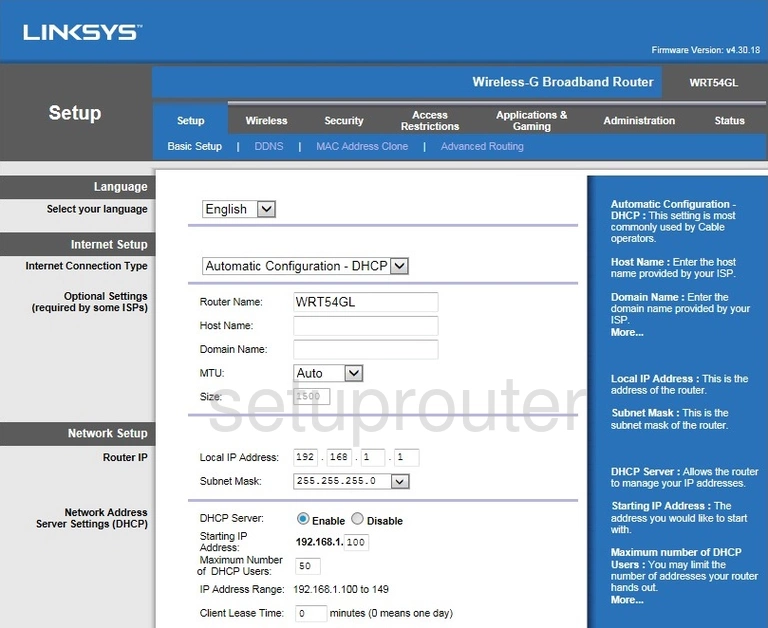
- Classic Linksys routers: go to Setup > Basic Setup. Under Network Setup, find Router IP and change the Local IP Address. Leave the Subnet Mask at 255.255.255.0 and click Save Settings.
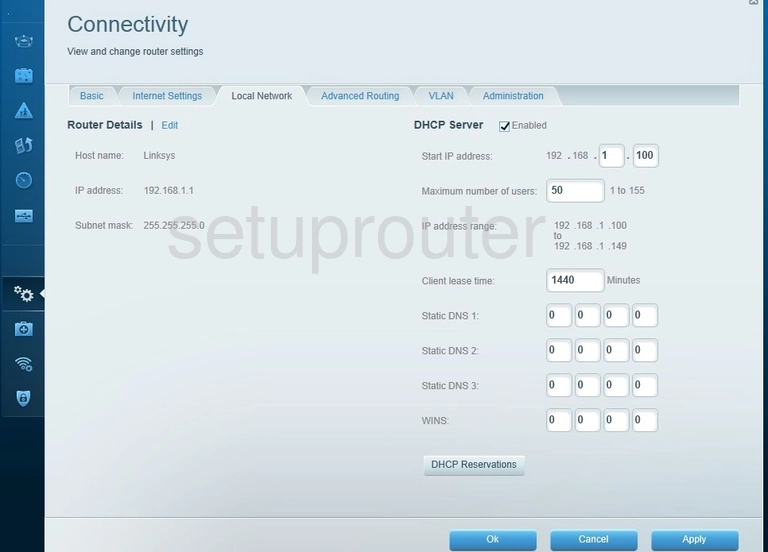
- Smart Wi-Fi routers: go to Connectivity > Local Network, click Edit next to the router details, enter the new IP address, and click OK or Apply.
After the change your device loses its connection for a moment. Log back in using the new address. If the router hands out addresses with DHCP, its address range moves to match the new address automatically on most models.