


A factory reset puts your Netgate router back to its default settings, including the default login.
Before You Reset
A reset erases your WiFi name and password, Internet login and port forwards, so write them down. A restart (power off for 30 seconds) keeps all your settings.
Method 1: The Console or the Reset Button
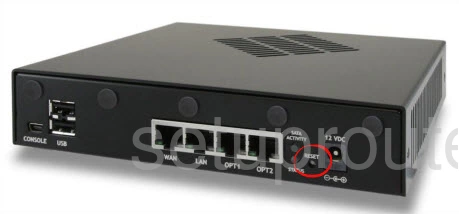
- From the console (serial or VGA): choose option 4) Reset to factory defaults from the menu, and confirm.
- Reset button: many Netgate appliances (such as the SG-1100, 2100 and 4100) have a recessed reset button. Hold it while the unit starts until the status light changes, or see Netgate's documentation for your model.
Method 2: Reset From the Web Interface
Log in, go to Diagnostics > Factory Defaults and confirm.
After the Reset
Log in at http://192.168.1.1 with the defaults (see the Netgate login guide), set a new admin password, and set up your WiFi and Internet connection again.