


Most Sagemcom gateways use 192.168.1.1. Some ISP versions use 192.168.0.1 or 192.168.1.254.
Common Sagemcom Addresses
- 192.168.1.1: most F@st and Livebox gateways.
- 192.168.0.1: some ISP versions.
- 192.168.1.254: Plusnet and some other UK ISP versions.
- 10.0.0.138, 192.168.2.1, 192.168.254.254: other ISP versions.
Every Known Sagemcom Default IP Address
| Sagemcom Model | IP Address |
| 2704N Plusnet | 192.168.1.254 |
| 2705N Plusnet | 192.168.1.254 |
| 2804STC | 192.168.1.1 |
| 3764 | 192.168.1.1 |
| CS 50001 | 192.168.1.1 |
| EMTA62-3 | 192.168.1.1 |
| F3896LG-VMB | 192.168.0.1 |
| F5366s | 192.168.1.254 |
| Fast 1500WG | 192.168.2.1 |
| Fast 1704 | 192.168.1.1 |
| Fast 1704 | 192.168.254.254 |
| Fast 1704N | 192.168.1.1 |
| Fast 1704n Windstream Communications | 192.168.254.254 |
| Fast 2000 | 192.168.1.1 |
| Fast 2404 | 192.168.1.1 |
| Fast 2444 | 192.168.0.1 |
| Fast 2444 | 192.168.1.1 |
| Fast 2504 | 192.168.0.1 |
| Fast 2504 Sky | 192.168.0.1 |
| Fast 2504 Sky | 192.168.1.1 |
| Fast 2504n Sky | 192.168.0.1 |
| Fast 2504n Sky | 192.168.1.1 |
| Fast 2604 Topnet | 192.168.1.1 |
| Fast 2744R | 192.168.5.1 |
| FAST 2864 | 192.168.2.1 |
| FAST 3001 | 192.168.30.1 |
| Fast 3184 | 192.168.1.1 |
| Fast 3284 | 192.168.1.1 |
| Fast 3302 | 192.168.30.1 |
| Fast 3304 | 192.168.1.1 |
| Fast 3464 | 192.168.1.1 |
| Fast 3686 | 192.168.0.1 |
| Fast 3686 | 192.168.1.1 |
| Fast 3686 DNA | 192.168.1.1 |
| Fast 3686 Get | 192.168.0.1 |
| Fast 3686 V3ch | 192.168.0.1 |
| Fast 3864AC | 192.168.0.1 |
| Fast 3864v2 | 192.168.0.1 |
| Fast 3864V2 Optus | 192.168.0.1 |
| Fast 3864V3AC | 192.168.0.1 |
| Fast 3864V3HP | 192.168.0.1 |
| Fast 3864V3HP | 192.168.254.254 |
| Fast 3890V2 | 192.168.0.1 |
| Fast 3890v3 | 192.168.0.1 |
| Fast 4315NHP | 192.168.1.1 |
| Fast 4315U | 10.0.0.138 |
| Fast 4315U | belong.gateway |
| Fast 4320 | 192.168.254.254 |
| Fast 4353-A | 10.0.0.138 |
| Fast 4360 Air | 192.168.2.252 |
| Fast 5250 | 192.168.2.1 |
| Fast 5260 | 192.168.1.1 |
| Fast 5280 | 192.168.1.1 |
| Fast 5340 TFN | 192.168.1.1 |
| Fast 5345 | 192.168.1.1 |
| Fast 5350GV | 192.168.25.1 |
| Fast 5355 | 10.0.0.138 |
| Fast 5359 | 192.168.2.254 |
| Fast 5359 | http://mijnmodem.kpn/ |
| Fast 5360 | 192.168.1.1 |
| Fast 5364 | 192.168.1.1 |
| Fast 5366 | 192.168.0.1 |
| Fast 5366 | 192.168.1.1 |
| Fast 5366 | 192.168.1.254 |
| Fast 5366 LTE-A | 192.168.0.1 |
| Fast 5366 TN | 10.0.0.138 |
| Fast 5366 TN | 192.168.1.254 |
| Fast 5366 TN-A | 192.168.0.1 |
| Fast 5366SD | 192.168.1.254 |
| Fast 5370 AIR | 192.168.1.1 |
| Fast 5370e | 192.168.1.1 |
| Fast 5566 | 192.168.2.1 |
| Fast 5650 | 192.168.25.1 |
| Fast 5655v2AC | 192.168.1.1 |
| Fast 5655v2AC | 192.168.1.254 |
| Fast 5656 | 192.168.1.1 |
| Fast 5657 | 192.168.1.1 |
| Fast 5670 | 192.168.1.1 |
| Fast 5670 | http://sagemcom.ip/ |
| Fast 5688b | 192.168.1.254 |
| Fast 5689 | 192.168.2.1 |
| Fast 5689E | 192.168.2.1 |
| Fast 5866T | 192.168.1.1 |
| Fast-1704 | 192.168.1.1 |
| Fast_5310 | 192.168.1.1 |
| Fiber Box X6 | 192.168.1.1 |
| Fiber Box X6 | https://salt.box/ |
| FunBox 3.0 | 192.168.1.1 |
| Livebox 2 | 192.168.1.1 |
| Livebox 3 | 192.168.1.1 |
| Livebox 4 | 192.168.1.1 |
| Livebox 7359 | 192.168.1.1 |
| Livebox Fast 3202 | 192.168.0.1 |
| Livebox Fast 3202 | 192.168.1.1 |
| Livebox Fibra Fast 5656 | 192.168.1.1 |
| Livebox Fibra Fast 5656 | http://liveboxfibra/ |
| Livebox Fibre | 192.168.1.1 |
| Livebox FTTH v2 | 192.168.1.1 |
| Livebox FTTH v2 | http://livebox |
| Livebox TP Fast 3202 | 192.168.1.1 |
| RAC2V1S | 192.168.1.1 |
| RAC2V2S | 192.168.1.1 |
| SMBSJOFIBER | 192.168.1.1 |
Find Your Gateway's IP Address
Run ipconfig on Windows and read Default Gateway, or look for Router in your WiFi network's details. See How To Find Your Router's IP Address.
Change the Gateway's IP Address
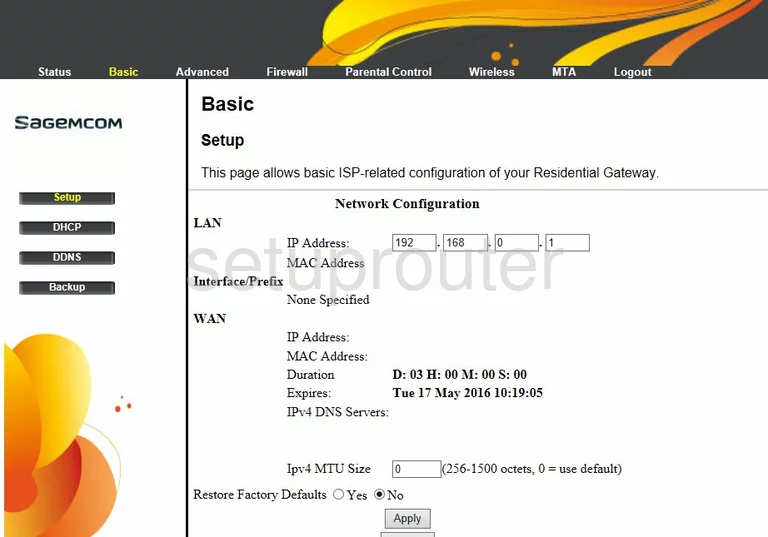
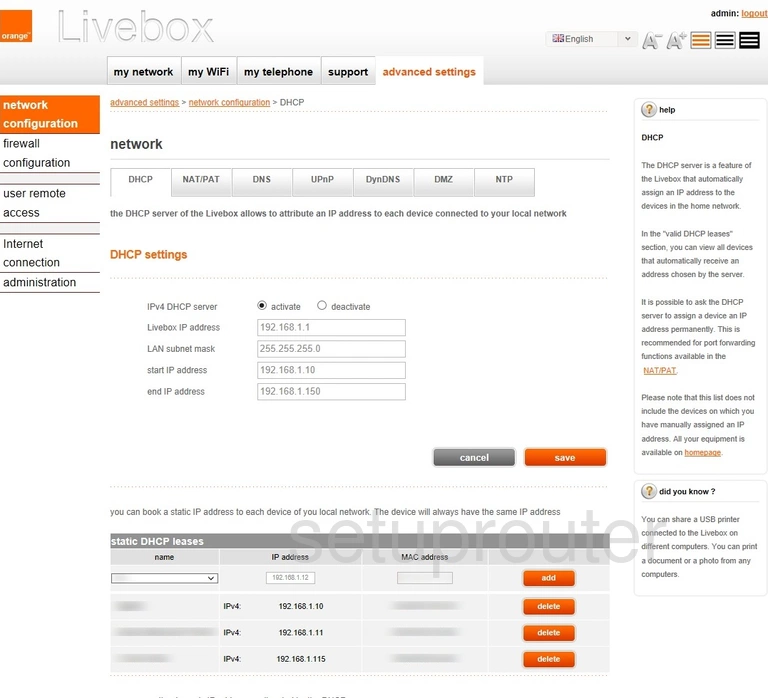
Log in, then look under Network > LAN (or Basic Setup > LAN, or on a Livebox, Advanced settings > Network > DHCP). Change the gateway's IP address, then save.
Some ISP builds don't let you change it.