


This guide shows you how to reset your Viasat RG1100N router to factory default settings. This is a much bigger deal than a router reboot. Rebooting a router is simply turning it off and back on again. However, when you reset a router you, return it back to its factory default settings.
Warning: Proceed with caution; resetting your router can be a major headache. When you reset your router, the following will happen.
- The router's username and password are reset to factory defaults.
- Your WiFi name and password are reset.
- Your ISP settings are reset, which means you will have to contact your ISP to get them back.
- Any parental controls, firewall settings, or port forwards will be removed.
A router reset is the last step you should take in recovering your router's password. You should be sure that you have tried to at least recover your router password using our Router Password Finder before resorting to a router reset.
Other Viasat RG1100N Guides
This is the reset router guide for the Viasat RG1100N 3.7.9.13.2. We also have the following guides for the same router:
Recover Password in Viasat RG1100N
If you are resetting your router because you forgot your router password, then you should try running our Router Password Finder first.
Router Password Finder is designed from the ground up to help you recover your forgotten router username and password, which can save you a lot of time.
Router Password Finder - Recover Lost or Forgotten Router Passwords
If you are unable to recover your lost router password, then you may have to proceed with a full router reset.
Reset the Viasat RG1100N
On most routers you can find a small button on the back or the bottom labeled reset. What you are looking for is something that looks like this:
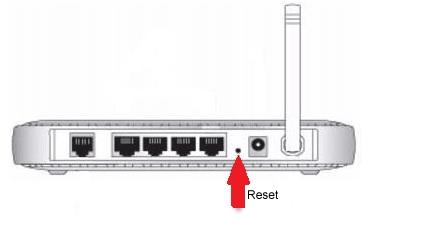
Even though yours may look slightly different, you need to look for a tiny button. Sometimes the reset button is under a pinhole on the back of the router, and you need a paper clip to push it.
Watch the front panel lights while you hold the reset button down for at least 10 seconds. The lights on the front of the router should do something different when the reset happens. You can hold the button down as long as you like, it will not hurt anything.
Don't forget, this step will totally reset your Viasat RG1100N router back to factory settings.
Only take this last step of fully resetting your router after you have exhausted all other troubleshooting options, such as running our Router Password Finder software, which can recover a lost router password for you.
Login to the Viasat RG1100N
Now you need to log in using the factory default username and password. You can follow the RG1100N Login Guide to find everything that you need to log in.
Change Your Password
Do not forget to change your router's default password when you log back into it. Since factory passwords are well known, it's a huge security risk to leave your router set to the default. If you need help coming up with a strong password, check out our Choosing a Strong Password guide.
Tip: Write your new password down on a post-it note and stick it to the bottom of your router.
Other Viasat RG1100N Guides
We have collected a lot of information about the Viasat RG1100N router. You can find some of our additional content here.
This is the reset router guide for the Viasat RG1100N 3.7.9.13.2. We also have the following guides for the same router: