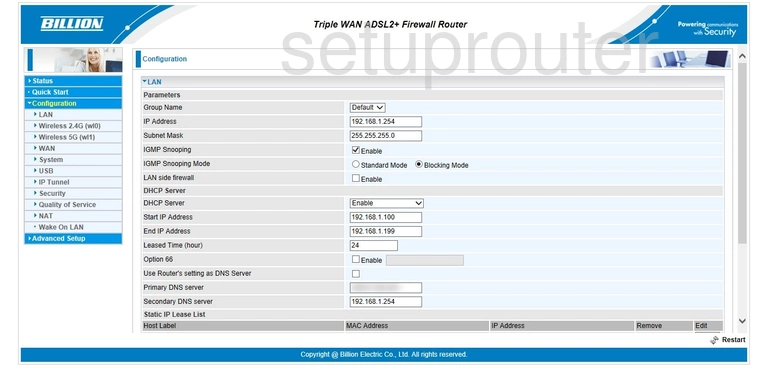
Almost every Billion router uses 192.168.1.254 as its default IP address.
Every Known Billion Default IP Address
| Billion Model | IP Address |
| 400G | 192.168.1.254 |
| 5102G | 10.0.0.2 |
| 5102G | 192.168.1.254 |
| 5200G | 192.168.1.254 |
| 5200S | 192.168.1.254 |
| 5210S | 192.168.1.254 |
| 7204W | 192.168.1.254 |
| 800VGT | 10.0.0.2 |
| 810VGTX | 10.0.0.2 |
| 810VGTX | 192.168.1.254 |
| Biguard 2 | 192.168.1.254 |
| Biguard 30 | 192.168.21.1 |
| Bipac 5100 | 192.168.1.254 |
| Bipac 5100S | 192.168.1.254 |
| Bipac 5100W | 192.168.1.254 |
| Bipac 5102 | 192.168.1.254 |
| Bipac 51025 | 192.168.1.1 |
| Bipac 5102G | 192.168.1.254 |
| Bipac 5102s | 192.168.1.254 |
| Bipac 5112S | 192.168.1.254 |
| Bipac 5112S | 192.168.10.254 |
| Bipac 5200 | 192.168.1.254 |
| Bipac 5210S | 192.168.1.254 |
| Bipac 6404VGP | 192.168.3.1 |
| Bipac 640AE | 192.168.1.254 |
| Bipac 640SE | 192.168.1.254 |
| Bipac 643 | 192.168.1.254 |
| Bipac 7025 | 192.168.1.254 |
| Bipac 7100S | 192.168.1.254 |
| Bipac 711CE | 10.0.0.2 |
| Bipac 7202A | 192.168.1.254 |
| Bipac 7202GR2A | 192.168.1.254 |
| Bipac 7300A | 192.168.1.254 |
| Bipac 7300G RA | 192.168.1.254 |
| Bipac 7300GA | 192.168.1.254 |
| Bipac 7300GX | 192.168.1.254 |
| BiPAC 7300NX | 192.168.1.254 |
| Bipac 7300RA | 192.168.1.254 |
| Bipac 7300W | 192.168.1.254 |
| Bipac 740 | 192.168.1.254 |
| Bipac 7401VGP | 192.168.1.254 |
| Bipac 7401VGPR3 | 192.168.1.254 |
| Bipac 7401VP | 192.168.1.254 |
| Bipac 7402g | 192.168.1.254 |
| Bipac 7402GL | 192.168.1.254 |
| Bipac 7402NX | 192.168.1.254 |
| Bipac 7402VGO | 192.168.1.254 |
| Bipac 7404VGO | 192.168.1.254 |
| Bipac 7404VGOX | 192.168.1.254 |
| Bipac 7404VGP | 192.168.1.254 |
| Bipac 7404VNOX | 192.168.1.254 |
| Bipac 7404VNPX | 192.168.1.254 |
| Bipac 7404VPNX | 192.168.1.254 |
| Bipac 741 | 192.168.1.254 |
| Bipac 743 | 192.168.1.254 |
| Bipac 7500g | 192.168.1.254 |
| Bipac 7560 | 192.168.1.254 |
| Bipac 7700N R2 | 192.168.1.254 |
| BiPAC 7800DXL | 192.168.1.254 |
| Bipac 7800N | 192.168.1.254 |
| Bipac 7800NL | 192.168.1.254 |
| BiPAC 7800NXL | 192.168.1.254 |
| BiPAC 7800VDOX | 192.168.1.254 |
| BiPAC 8800AXL R2 | 192.168.1.254 |
| BiPAC 8800NL | 192.168.1.254 |
| BiPAC 8900AX2400 | 192.168.1.254 |
| BiPAC-7401VGP-R3 | 192.168.1.254 |
| myGuard 7202GA | 192.168.1.254 |
Find Your Router's IP Address
Run ipconfig on Windows and read Default Gateway, or see How To Find Your Router's IP Address.
Change the Router's IP Address
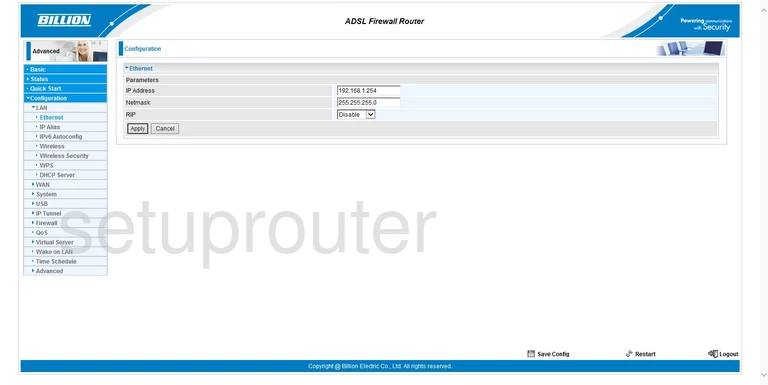
Log in and go to Configuration > LAN > Ethernet. Change the IP Address, then click Apply. Then save the configuration (SAVE CONFIG at the top on most models).