


DrayTek Vigor routers use 192.168.1.1 as their default IP address.
Every Known DrayTek Default IP Address
| Draytek Model | IP Address |
| Vigor 2130 | 192.168.1.1 |
| Vigor 2130n | 192.168.1.1 |
| Vigor 2132F | 192.168.1.1 |
| Vigor 2132FVn | 192.168.1.1 |
| Vigor 2200E | 192.168.1.1 |
| Vigor 2500 | 192.168.1.1 |
| Vigor 2500V | 192.168.1.1 |
| Vigor 2600WE | 192.168.1.1 |
| Vigor 2700V | 192.168.1.1 |
| Vigor 2800G | 192.168.1.1 |
| Vigor 2830 | 192.168.1.1 |
| Vigor 2900V | 192.168.1.1 |
| Vigor 2910 | 192.168.1.1 |
| Vigor 2930 | 192.168.1.1 |
| Vigor 2930n | 192.168.1.1 |
| Vigor-2110 | 192.168.1.1 |
| Vigor-2710 | 192.168.1.1 |
| Vigor-2710n | 192.168.1.1 |
| Vigor-2820n | 192.168.1.1 |
| Vigor-2920 | 192.168.1.1 |
| Vigor2132FVn | 192.168.1.1 |
| Vigor2860n-plus | 192.168.1.1 |
| Vigor2860Vn-plus | 192.168.1.1 |
| VigorPro 5300 | 192.168.1.1 |
Find Your Router's IP Address
Run ipconfig on Windows and read Default Gateway, or see How To Find Your Router's IP Address.
Change the Router's IP Address
- Log in and go to LAN > General Setup.
- Click Details Page for LAN 1.
- Change the IP Address (and the DHCP start address to match), then click OK.
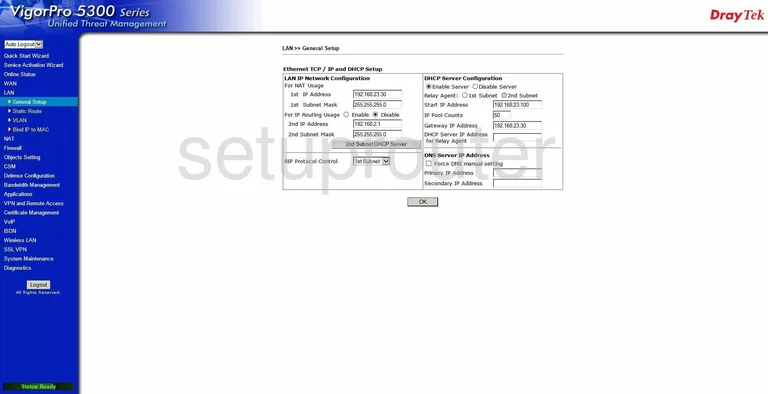
The router restarts. Log back in at the new address.