


This page shows how to change the LAN IP Address on the Thomson Alcatel TCW750-4 router.
Other Thomson Alcatel TCW750-4 Guides
This is the ip address guide for the Thomson Alcatel TCW750-4. We also have the following guides for the same router:
- Thomson Alcatel TCW750-4 - Thomson Alcatel TCW750-4 User Manual
- Thomson Alcatel TCW750-4 - Thomson Alcatel TCW750-4 Login Instructions
- Thomson Alcatel TCW750-4 - Setup WiFi on the Thomson Alcatel TCW750-4
- Thomson Alcatel TCW750-4 - Information About the Thomson Alcatel TCW750-4 Router
- Thomson Alcatel TCW750-4 - Thomson Alcatel TCW750-4 Screenshots
- Thomson Alcatel TCW750-4 - Reset the Thomson Alcatel TCW750-4
What is the LAN IP Address of a Router
The LAN IP Address of a router is also known as its internal IP address. It is also the IP address that you connect to when you want to configure your router. It is only useful from inside your network and has no use from the Internet side.
Routers have 2 IP addresses: an internal ip address and an external ip address. The external IP address is assigned to you by your Internet Service Provider, or ISP, and is generally not something that you can change. The internal IP address is set to a default value at the factory but can be changed if you want.
Common internal IP addresses for routers are:
- 192.168.0.1
- 192.168.1.1
- 10.0.0.1
It is generally a good idea to make the last number of your router's internal IP address a '1', as in 192.168.0.1 or 10.0.0.1. This is not necessary, but many people do it and it makes it a bit easier to remember which IP address is assigned to your router. If you want to change the internal IP address of your router, this guide shows you how.
Login To The Thomson Alcatel TCW750-4
To get started configuring the Thomson Alcatel TCW750-4 LAN page you need to login to your router. If you are already logged in you can skip this step.
To login to the Thomson Alcatel TCW750-4, follow our Thomson Alcatel TCW750-4 Login Guide.
Change the LAN IP Address on a Thomson Alcatel TCW750-4
If you followed our login guide above then you should see this screen.
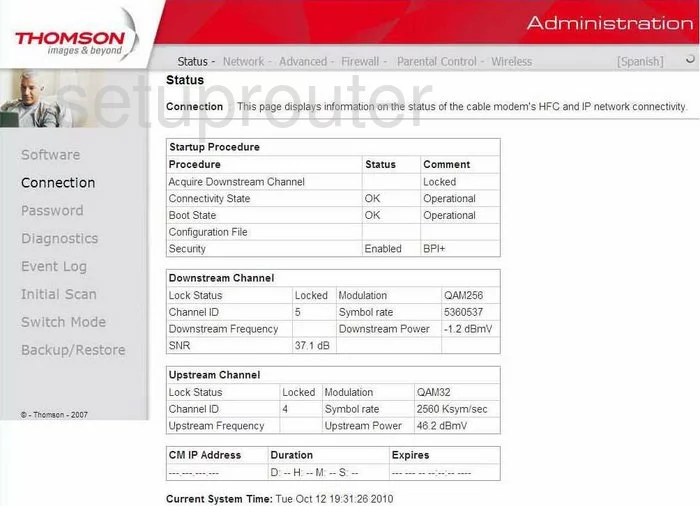
After logging into the Thomson TCW750-4 you begin on the Status page of this Router. To change your Router IP Address, or the address you see from inside your network, click the choice in the top bar, labeled Network. Then on the left, LAN.
Configure the LAN section of your Thomson Alcatel TCW750-4
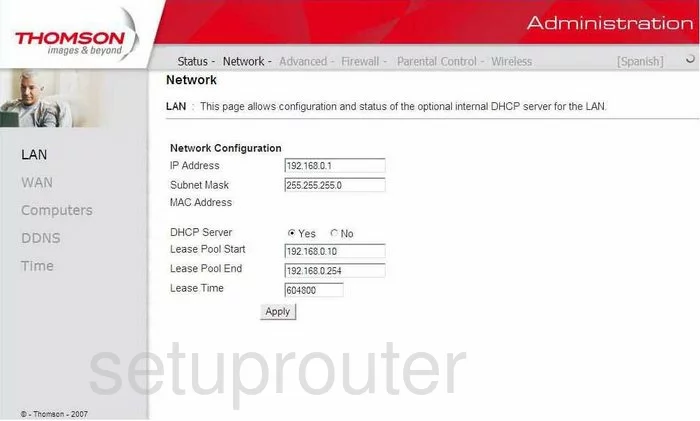
On this new page, put your cursor in the box labeled IP Address and enter your new address you have chosen for your Router. We recommend 192.168.1.1
Make sure that while you make this change, don't change the Subnet Mask, this is the access point that the network sees. The Subnet Mask should remain at 255.255.255.0
When you are finished, click Apply.
Possible Problems when Changing your LAN IP Address
When you change your LAN IP Address you are making a fundamental change to how your network functions and all computers on your network will be affected. You will lose your Internet connection when you apply these changes. Your router may reboot and require a couple of minutes to start responding again.
Also note that some computers may need to be rebooted after you make this change before they can talk to the router or on the Internet again.
Other Thomson Alcatel TCW750-4 Info
Don't forget about our other Thomson Alcatel TCW750-4 info that you might be interested in.
This is the ip address guide for the Thomson Alcatel TCW750-4. We also have the following guides for the same router:
- Thomson Alcatel TCW750-4 - Thomson Alcatel TCW750-4 User Manual
- Thomson Alcatel TCW750-4 - Thomson Alcatel TCW750-4 Login Instructions
- Thomson Alcatel TCW750-4 - Setup WiFi on the Thomson Alcatel TCW750-4
- Thomson Alcatel TCW750-4 - Information About the Thomson Alcatel TCW750-4 Router
- Thomson Alcatel TCW750-4 - Thomson Alcatel TCW750-4 Screenshots
- Thomson Alcatel TCW750-4 - Reset the Thomson Alcatel TCW750-4