Most ASUS routers use 192.168.1.1, and many newer ones use 192.168.50.1. You can also reach any current ASUS router at http://router.asus.com, whatever its IP address is.
Common ASUS Addresses
- 192.168.1.1: most RT-N and RT-AC routers and DSL modem routers.
- 192.168.50.1: many RT-AX, GT-AX and ZenWiFi models.
- router.asus.com: the login page of any current ASUS router.
- 10.10.1.1: some older and ISP models.
Every Known ASUS Default IP Address
| Asus Model | IP Address |
| 4G-AC53U | 192.168.1.1 |
| 4G-AC55U | 192.168.1.1 |
| 4G-AC68U | 192.168.1.1 |
| 4G-AX56 | 192.168.1.1 |
| 4G-N12 | 192.168.1.1 |
| AAM6000EV | 192.168.1.1 |
| AAM6010EV | 192.168.1.1 |
| AAM6010EV-T4 | 192.168.1.1 |
| AAM6310 | 10.0.0.138 |
| AM602 | 192.168.1.1 |
| AM604 | 192.168.1.1 |
| AM604G | 192.168.1.1 |
| AX6000 | 192.168.1.1 |
| AX6000 | http://router.asus.com/ |
| Blue Cave | 192.168.1.1 |
| Blue Cave | http://router.asus.com/ |
| CM-32_AC2600 | 192.168.1.1 |
| DSL-AC3100 | 192.168.1.1 |
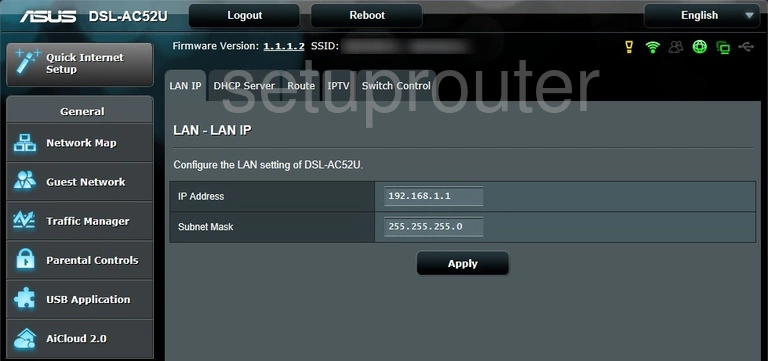
| DSL-AC52U | 192.168.1.1 |
| DSL-AC68U | 192.168.1.1 |
| DSL-AC88U | 192.168.1.1 |
| DSL-N10E | 192.168.1.1 |
| DSL-N11 | 192.168.1.1 |
| DSL-N12E_C1 | 192.168.1.1 |
| DSL-N12HP | 192.168.1.1 |
| DSL-N12U B1 | 192.168.1.1 |
| DSL-N13 | 192.168.1.1 |
| DSL-N14U B1 | 192.168.1.1 |
| DSL-N16 | 192.168.1.1 |
| DSL-N17U | 192.168.1.1 |
| DSL-N55U | 192.168.1.1 |
| G-136 | 192.168.1.1 |
| GT-AC2900 | 192.168.1.1 |
| GT-AC2900 | http://router.asus.com/ |
| GT-AC5300 | 192.168.1.1 |
| GT-AC5300 | http://router.asus.com/ |
| GT-AX11000 | 192.168.1.1 |
| GT-AX11000 | 192.168.50.1 |
| GT-AX11000 | http://router.asus.com/ |
| GT-AXE11000 | 192.168.1.1 |
| GT-AXE11000 | http://router.asus.com/ |
| RT-AC1200 | 192.168.1.1 |
| RT-AC1200 | 192.168.50.1 |
| RT-AC1200 | http://router.asus. com/ |
| RT-AC1200G+ | 192.168.1.1 |
| RT-AC1200G+ | http://router.asus.com/ |
| RT-AC1200HP | 192.168.1.1 |
| RT-AC1750 | 192.168.1.1 |
| RT-AC1750 | http://router.asus.com |
| RT-AC1750_B1 | 192.168.1.1 |
| RT-AC1900 | 192.168.1.1 |
| RT-AC1900P | 192.168.1.1 |
| RT-AC1900P | http://router.asus.com/ |
| RT-AC3100 | 192.168.1.1 |
| RT-AC3100 | http://router.asus.com/ |
| RT-AC3200 | 192.168.1.1 |
| RT-AC3200 | http://router.asus.com/ |
| RT-AC51U | 192.168.1.1 |
| RT-AC51U | http://router.asus.com/ |
| RT-AC52U | 192.168.1.1 |
| RT-AC53 | 192.168.1.1 |
| RT-AC5300 | 192.168.1.1 |
| RT-AC5300 | http://router.asus.com/ |
| RT-AC55U | 192.168.1.1 |
| RT-AC56R | 192.168.1.1 |
| RT-AC56S | 192.168.1.1 |
| RT-AC56S | http://router.asus.com/ |
| RT-AC56U | 192.168.1.1 |
| RT-AC66R | 192.168.1.1 |
| RT-AC66U | 192.168.1.1 |
| RT-AC66U B1 | 192.168.1.1 |
| RT-AC66U B1 | http://router.asus.com/ |
| RT-AC66U_B1 | 192.168.1.1 |
| RT-AC66U_B1 | http://router.asus.com/ |
| RT-AC68P | 192.168.1.1 |
| RT-AC68R | 192.168.1.1 |
| RT-AC68U | 192.168.1.1 |
| RT-AC68U | http://router.asus.com/ |
| RT-AC68U C1 | 192.168.21.1 |
| RT-AC68W | 192.168.1.1 |
| RT-AC86U | 192.168.1.1 |
| RT-AC87R | 192.168.1.1 |
| RT-AC87U | 192.168.1.1 |
| RT-AC88U | 192.168.1.1 |
| RT-AC88U | http://router.asus.com/ |
| RT-ACRH13 | 192.168.1.1 |
| RT-ACRH13 | http://router.asus.com/ |
| RT-ACRH17 | 192.168.1.1 |
| RT-ARCH13 | 192.168.1.1 |
| RT-AX1800S | 192.168.1.1 |
| RT-AX1800S | http://router.asus.com/ |
| RT-AX3000 | 192.168.1.1 |
| RT-AX3000 | http://router.asus.com/ |
| RT-AX53U | 192.168.50.1 |
| RT-AX53U | http://router.asus.com/ |
| RT-AX55 | 192.168.50.1 |
| RT-AX55 | http://router.asus.com/ |
| RT-AX56U | 192.168.1.1 |
| RT-AX56U | http://router.asus.com/ |
| RT-AX58U | 192.168.1.1 |
| RT-AX58U | http://router.asus.com/ |
| RT-AX68U | 192.168.1.1 |
| RT-AX68U | http://router.asus.com/ |
| RT-AX86U | 192.168.1.1 |
| RT-AX86U | http://router.asus.com/ |
| RT-AX88U | 192.168.1.1 |
| RT-AX88U | http://router.asus.com/ |
| RT-AX92U | 192.168.1.1 |
| RT-AX92U | http://router.asus.com/ |
| RT-G32 | 192.168.1.1 |
| RT-N10 | 192.168.1.1 |
| RT-N10 | 192.168.2.1 |
| RT-N10E | 192.168.2.1 |
| RT-N10U | 192.168.1.1 |
| RT-N11 | 192.168.1.1 |
| RT-N12 | 192.168.1.1 |
| RT-N12 D1 | 192.168.1.1 |
| RT-N12B1 | 192.168.1.1 |
| RT-N12D1 | 192.168.1.1 |
| RT-N12E | 192.168.1.1 |
| RT-N12E_B1 | 192.168.1.1 |
| RT-N12HP_B1 | 192.168.1.1 |
| RT-N12VP | 192.168.1.1 |
| RT-N14UHP | 192.168.1.1 |
| RT-N14UHP | http://router.asus.com/ |
| RT-N15 | 192.168.2.1 |
| RT-N15U | 192.168.1.1 |
| RT-N16 | 192.168.1.1 |
| RT-N18U | 192.168.1.1 |
| RT-N53 | 192.168.1.1 |
| RT-N56U | 192.168.1.1 |
| RT-N56UB1 | 192.168.1.1 |
| RT-N600 | 192.168.1.1 |
| RT-N65R | 192.168.1.1 |
| RT-N65U | 192.168.1.1 |
| RT-N66R | 192.168.1.1 |
| RT-N66U | 192.168.1.1 |
| RT-N66U | 192.168.199.1 |
| RT-N66W | 192.168.1.1 |
| RX3041 | 192.168.1.1 |
| RX3041-G | 192.168.1.1 |
| RX3041H | 192.168.0.1 |
| SP-AC2015 | 192.168.27.1 |
| TM-AC1900 | 192.168.1.1 |
| TUF-AX3000 | 192.168.1.1 |
| TUF-AX3000 | 192.168.50.1 |
| TUF-AX3000 | http://router.asus.com/ |
| WL-500G | 192.168.1.1 |
| WL-500GP | 10.10.1.1 |
| WL-500W | 192.168.1.1 |
| WL-520G | 192.168.1.1 |
| WL-520GC | 192.168.1.1 |
| WL-520GU | 192.168.1.1 |
| WL-530G | 192.168.1.1 |
| WL-566GM | 192.168.1.1 |
| WL-700GE | 192.168.1.20 |
| WL500g Deluxe | 10.10.1.1 |
| WL500g Deluxe | 192.168.1.1 |
| WL500GP | 10.10.1.1 |
| WL520GC | 10.10.1.1 |
| WL520GU | 192.168.1.1 |
| WL550gE | 192.168.1.1 |
| WL600g | 192.168.1.1 |
| WL700gE | 192.168.1.1 |
| WL700gE | 192.168.1.20 |
| WMVN25E2+ | 192.168.1.1 |
| ZenWiFi AX Mini (XD4) | 192.168.1.1 |
| ZenWiFi AX Mini (XD4) | http://router.asus.com/ |
| ZenWiFi Pro ET12 | 192.168.1.1 |
| ZenWiFi Pro ET12 | http://router.asus.com/ |
Find Your Router's IP Address
Run ipconfig on Windows and read Default Gateway. On a Mac or phone, look for Router in your WiFi network's details. See How To Find Your Router's IP Address.
Change Your ASUS Router's IP Address
- Log in and go to Advanced Settings > LAN.
- On the LAN IP tab, change the IP Address. Keep the Subnet Mask at 255.255.255.0.
- Click Apply. The router restarts its network.
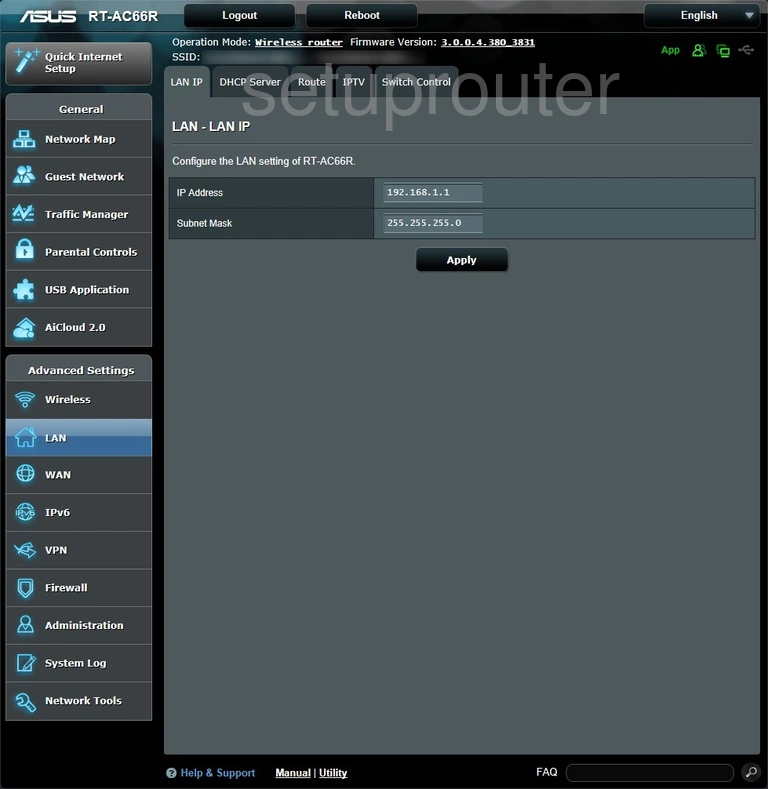
The DHCP range on the DHCP Server tab moves to match the new address. Log back in at the new address, or keep using router.asus.com.