


The Huawei EchoLife HG521 router is considered a wireless router because it offers WiFi connectivity. WiFi, or simply wireless, allows you to connect various devices to your router, such as wireless printers, smart televisions, and WiFi enabled smartphones.
Other Huawei EchoLife HG521 Guides
This is the wifi guide for the Huawei EchoLife HG521. We also have the following guides for the same router:
- Huawei EchoLife HG521 - How to change the IP Address on a Huawei EchoLife HG521 router
- Huawei EchoLife HG521 - Huawei EchoLife HG521 User Manual
- Huawei EchoLife HG521 - Huawei EchoLife HG521 Login Instructions
- Huawei EchoLife HG521 - How to change the DNS settings on a Huawei EchoLife HG521 router
- Huawei EchoLife HG521 - How to Reset the Huawei EchoLife HG521
- Huawei EchoLife HG521 - Information About the Huawei EchoLife HG521 Router
- Huawei EchoLife HG521 - Huawei EchoLife HG521 Screenshots
WiFi Terms
Before we get started there is a little bit of background info that you should be familiar with.
Wireless Name
Your wireless network needs to have a name to uniquely identify it from other wireless networks. If you are not sure what this means we have a guide explaining what a wireless name is that you can read for more information.
Wireless Password
An important part of securing your wireless network is choosing a strong password.
Wireless Channel
Picking a WiFi channel is not always a simple task. Be sure to read about WiFi channels before making the choice.
Encryption
You should almost definitely pick WPA2 for your networks encryption. If you are unsure, be sure to read our WEP vs WPA guide first.
Login To The Huawei EchoLife HG521
To get started configuring the Huawei EchoLife HG521 WiFi settings you need to login to your router. If you are already logged in you can skip this step.
To login to the Huawei EchoLife HG521, follow our Huawei EchoLife HG521 Login Guide.
Find the WiFi Settings on the Huawei EchoLife HG521
If you followed our login guide above then you should see this screen.
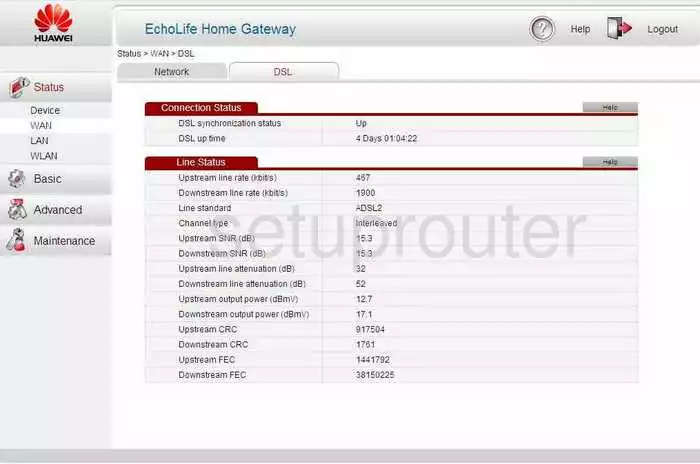
When you are finished logging into the Huawei EchoLife-HG521 router you should start on a page like the one you see above.
To change the WiFi settings on the Huawei EchoLife-HG521 router you first need to click the option in the left sidebar labeled Basic. Then under that choose WLAN.
Change the WiFi Settings on the Huawei EchoLife HG521
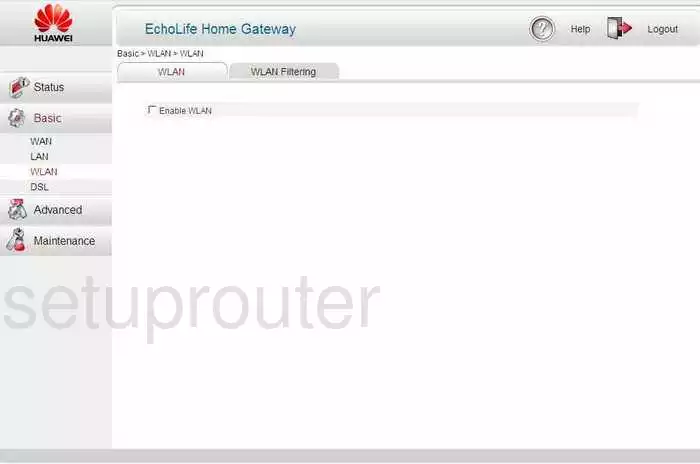
At this point a page like the one you see above should appear. The tab labeled WLAN at the top should be highlighted.
Put a check mark in the box labeled Enable WLAN.
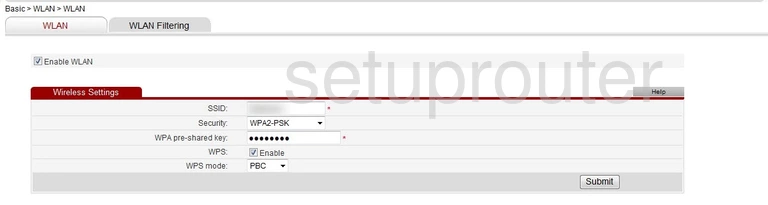
A new box appears on the page. In this box there are five options.
- SSID: This is the wireless name and should be changed from the default. Make this name unique but don't use personal info or router info as that gives a potential attacker hints. Learn more about SSIDs in our wireless names guide.
- Security: Use this drop down menu to choose the type of security you want to use to protect your local network. The best option is WPA2-PSK. What to know more? Read our WEP vs. WPA guide.
- WPA pre-shared key: This is the password for your Internet. It needs to be strong to protect your network. For a helpful guide on the topic check out our Choosing a Strong Password guide.
- WPS: What is WPS? We don't recommend using WPS as it is not as secure as using a pre-shared key.
- WPS mode: If you need to use WPS, we strongly encourage using the PBC method as it is stronger than the PIN method.
When you are happy with your changes you need to click the Submit button to save your changes.
Possible Problems when Changing your WiFi Settings
After making these changes to your router you will almost definitely have to reconnect any previously connected devices. This is usually done at the device itself and not at your computer.
Other Huawei EchoLife HG521 Info
Don't forget about our other Huawei EchoLife HG521 info that you might be interested in.
This is the wifi guide for the Huawei EchoLife HG521. We also have the following guides for the same router:
- Huawei EchoLife HG521 - How to change the IP Address on a Huawei EchoLife HG521 router
- Huawei EchoLife HG521 - Huawei EchoLife HG521 User Manual
- Huawei EchoLife HG521 - Huawei EchoLife HG521 Login Instructions
- Huawei EchoLife HG521 - How to change the DNS settings on a Huawei EchoLife HG521 router
- Huawei EchoLife HG521 - How to Reset the Huawei EchoLife HG521
- Huawei EchoLife HG521 - Information About the Huawei EchoLife HG521 Router
- Huawei EchoLife HG521 - Huawei EchoLife HG521 Screenshots